
Teacher Sorted · 3 October 2026 · 10 min read
AI tools for teachers: how Admin Sorted helps you get the admin done
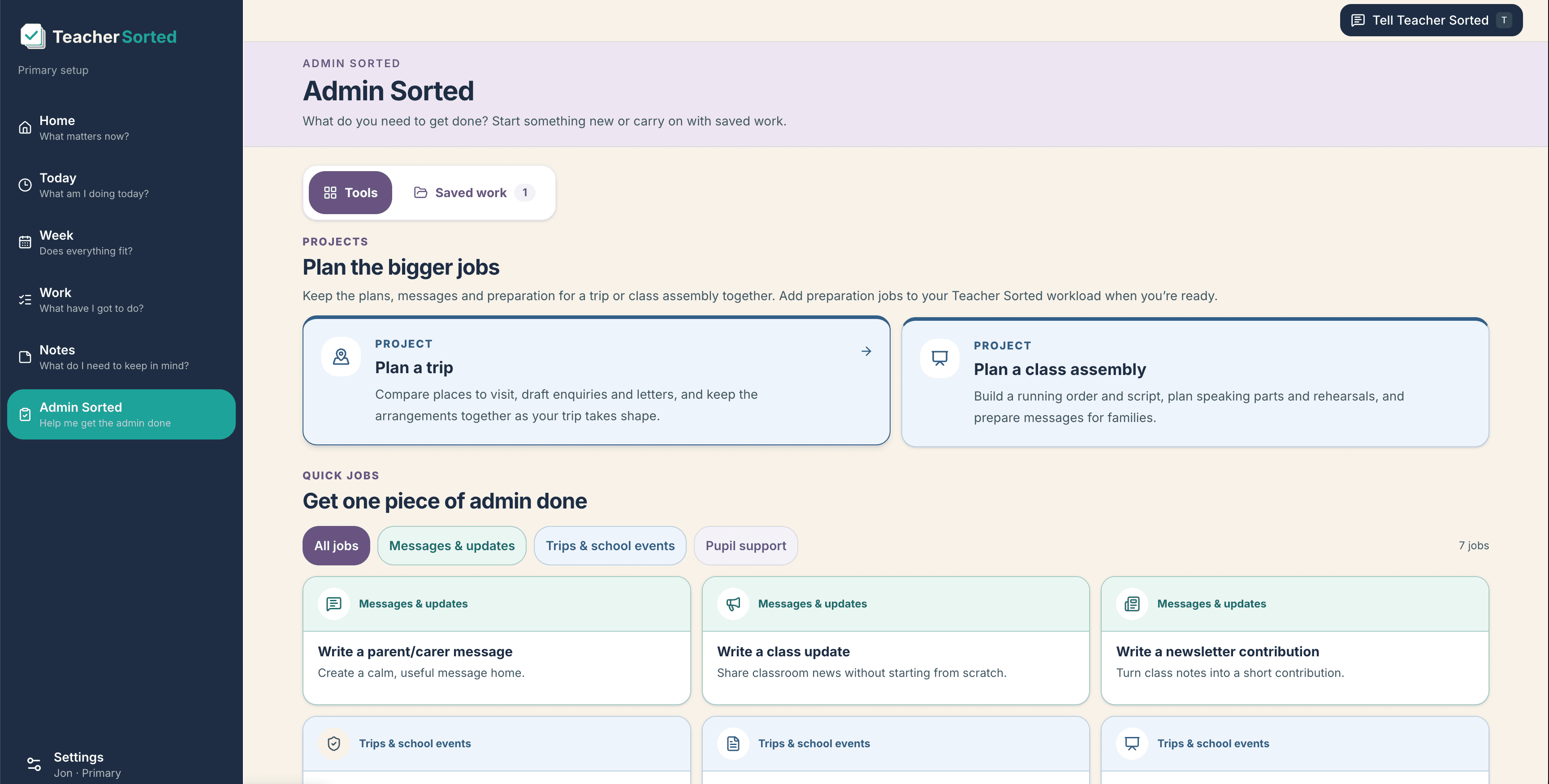
Admin Sorted is Teacher Sorted’s guided AI toolkit for parent messages, trips, assemblies, support targets and other teacher admin, built to save time without replacing professional judgement.
One of the mildly ridiculous things about teaching is how much time you spend doing things that are not actually teaching.
Parent messages. Letters. Newsletters. Meetings. Trips. Assemblies. Support plans. The email you have been meaning to reply to since lunchtime.
None of these jobs is especially difficult. That's almost the annoying part. Each one looks like a five-minute job until you have six of them open at once, one needs checking against something else, and another has somehow become a small project.
And the blank page doesn't help.
You know what you need to say. You just need to turn it into something clear, professional and usable, preferably without spending twenty minutes polishing a message that should have taken five.
That's the problem I wanted Admin Sorted to help with.
Admin Sorted is the AI admin toolkit inside Teacher Sorted. It's there for the bits around teaching: the messages, planning, organising and writing that need doing, but do not need to eat quite as much of your time as they often do.
It's not meant to replace your judgement. It's meant to get you past the blank page and through the admin a bit more quickly.
AI tools for teachers should not require another skill to learn
A lot of AI tools start with a blank chat box.
That's fine if you know exactly what to ask for. Less fine at 4.30pm when you are tired, you have a parent letter to write and the last thing you want to do is become an expert in prompt engineering.
I didn't want Admin Sorted to work like that.
You choose the job you are trying to do. Admin Sorted asks for the information it needs. You answer the questions, it gives you something useful to work from, and you check and edit the result.
So, rather than working out the perfect prompt for an AI parent letter generator, you choose Write a parent/carer message.
Rather than telling an AI to "act as an expert school trip planner" and hoping for the best, you use the Visit Planner and work through the actual decisions involved in organising a visit.
There are jobs for things like:
- Parent and carer messages
- Staff communication
- Newsletters and bulletins
- Clear explanations of school information
- Surveys and translations
- Assemblies
- School visits and trip admin
- Meetings and events
- Social media posts
- Pupil support targets
The point is not to give teachers more AI to play with. Teachers have enough things to play with.
The point is to help get a particular job done.
The five-minute message that somehow takes twenty
This is probably the simplest example.
You've just remembered that parents need to know about next week’s class visit.
The important information is already in your head:
Year 4 are visiting the museum next Thursday. Children need a packed lunch and a coat. Please return the slip by Tuesday. We will leave at 9.15 and be back before the end of the day.
You could write the whole thing from scratch. Then read it back. Then change the opening because it sounds too abrupt. Then check whether you've included the return time. Then read it again because there's always one detail hiding somewhere.
Or you can give Admin Sorted the important information and let it produce the first draft.
You still check the dates. You still add anything specific to your school. You still change the wording if it doesn't sound like you.
But you're editing something rather than staring at a blank box.
The same applies when you need to:
- Reply to a parent email without accidentally making the situation more heated
- Explain a change to a school routine
- Send a staff follow-up after a meeting
- Turn a handful of bullet points into a newsletter item
- Rewrite a complicated explanation in plain English
That, for me, is where AI is useful. Not deciding what you should say. Helping you say it clearly once you've decided.
School trips are never just one job
School trips are a good example of why I wanted some parts of Admin Sorted to be proper guided workflows rather than simple generators.
"Organise the trip" sounds like one task.
It's not one task.
There's the destination, purpose, possible dates, timings, pupil numbers, adult numbers, travel, lunch, clothing, costs, permissions, staffing, risk planning and the venue enquiry. Then somebody changes the date.
The Visit Planner breaks that into something you can actually work through.
You can add the destination, date window, number of pupils and adults, the purpose of the visit and the practical details. Admin Sorted can help you think through journey arrangements and possible risks, and then build an enquiry email with the information the venue is likely to need.
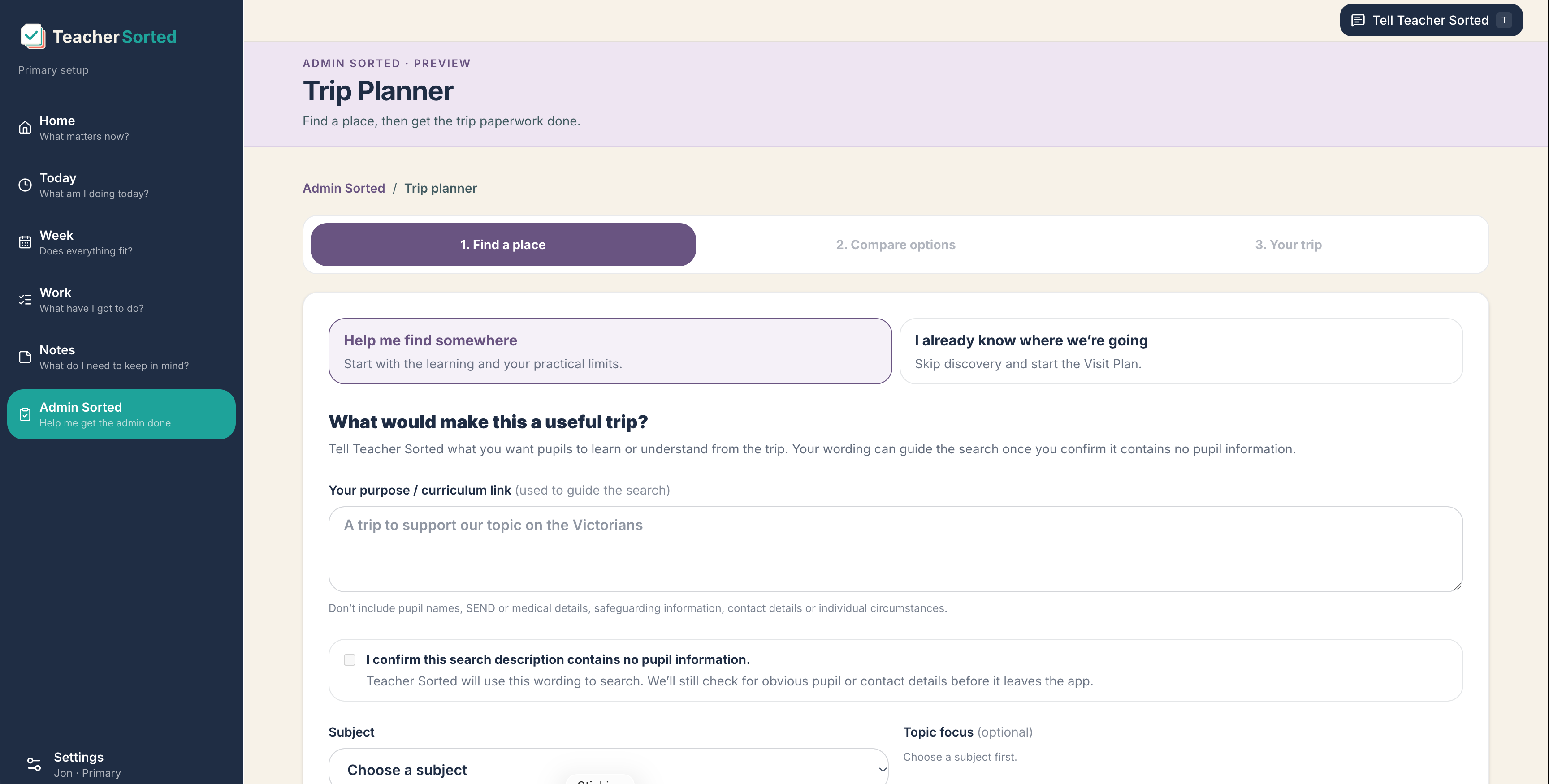
There's also a privacy check built into the workflow. You shouldn't be putting pupil names, medical information, safeguarding information, SEND details or individual circumstances into the trip description.
That's deliberate.
AI can help with the admin around a visit. It shouldn't encourage you to hand over sensitive pupil information just because there happens to be a text box.
And, importantly, the output is not your school’s final risk assessment. It doesn't replace your school procedures, the evidence you need to check or the judgement of the people responsible for the visit. It helps you get the admin into a sensible shape.
Assemblies have a habit of being tomorrow
You're told you need to lead a 15-minute Key Stage 2 assembly on hope.
You need a structure, something worth saying, perhaps a short story, a bit of pupil participation and an ending that makes it reasonably clear the assembly has actually finished.
You could start searching, open six tabs and piece it together.
Or you can use the Assembly Generator.
You choose the topic, phase, length, audience and number of pupil speaking roles. You can add things like drama or links to current learning if they're useful. Admin Sorted then gives you a timed structure and a script to work from.
Again, I wouldn't suggest reading it word for word without looking at it first. You know your pupils. You know your school. You know whether a particular phrase will land well or make thirty children stare at you blankly.
But it gets you a lot further than an empty document at the end of the day.
The same idea carries into meetings and school events too. A job called "sort production" or "plan event" isn't especially helpful. Breaking it into the actual things that need doing is.
Turning a vague support target into something useful
Pupil support is an area where I think the distinction between helping with admin and making professional decisions really matters.
You might know that a pupil needs to build confidence, improve fluency or get better at starting independent work.
The problem is that "needs to improve confidence" is not a very useful target.
It doesn't tell you where the pupil is now, what the next step is or how anybody will know whether things have improved.
The Pupil Support Target Builder starts with the current position. It asks what the pupil is finding difficult, what they can already do and what a meaningful next step might look like.
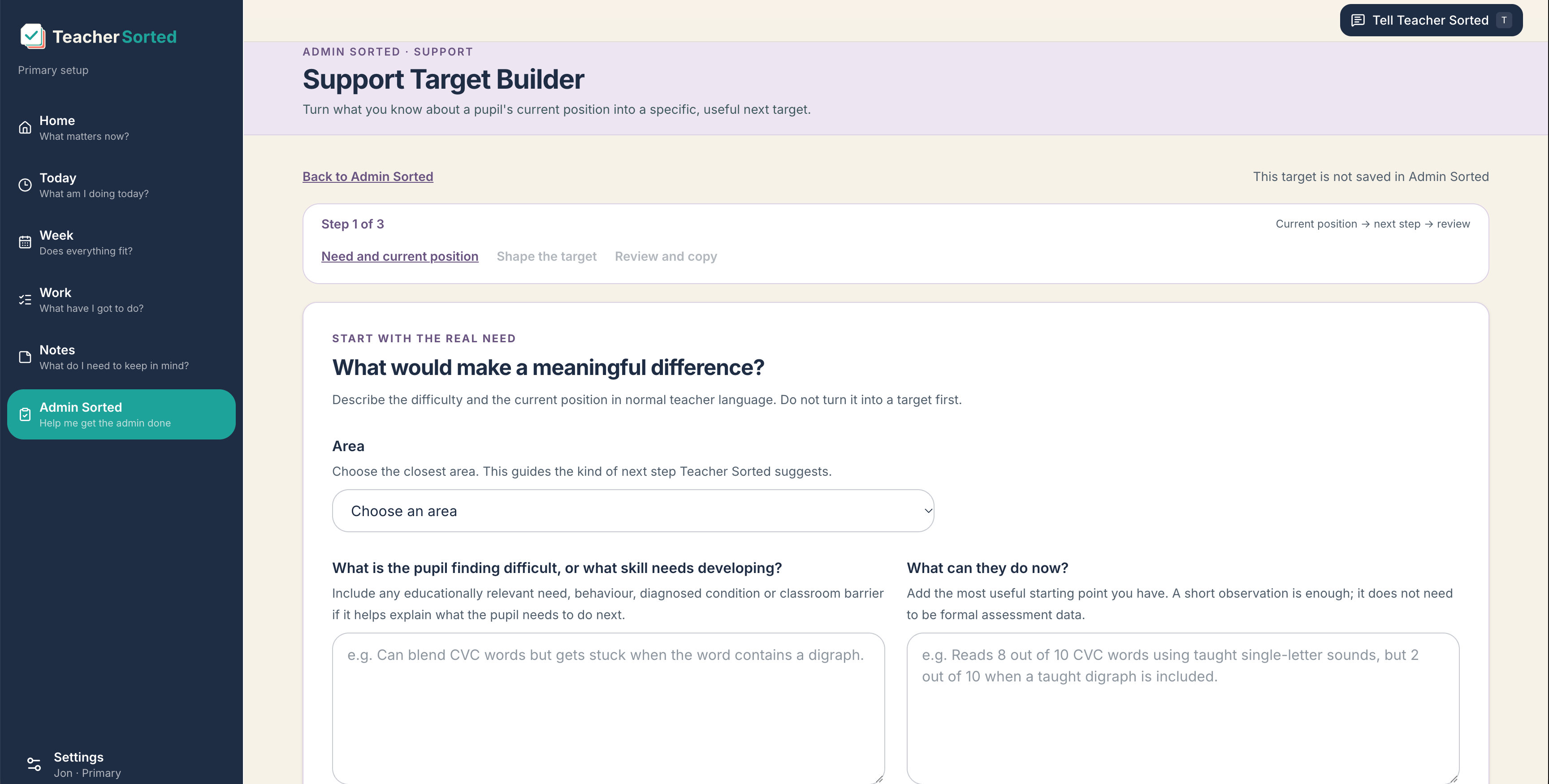
So rather than starting with something vague, you might record:
Can blend CVC words but gets stuck when the word contains a digraph.
And perhaps:
Reads 8 out of 10 CVC words using taught single-letter sounds, but 2 out of 10 when a taught digraph is included.
That's much more useful information to work from.
Admin Sorted can help turn that into a clearer target that is easier to use and review.
Privacy matters here too. The workflow encourages initials or general descriptions rather than pupil names, and it's not the place for identifiable casework, safeguarding information, medical details or unnecessary SEND information.
The tool can help you shape the target. The decision about what is appropriate for that child is still yours.
I want AI doing the admin bit, not the teacher bit
This is probably the line I care about most.
There are lots of perfectly sensible uses of AI for teachers.
A first draft of a letter? Fine.
A calmer version of an email you've written while slightly irritated? Very useful.
Turning meeting notes into actions? Great.
Helping structure an assembly, trip or survey? Also useful.
Making a judgement about a pupil, family or sensitive situation? No.
Admin Sorted can help with the wording and organisation. It doesn't know the whole context and it doesn't take responsibility for the decision.
You still need to check the facts, dates, names, tone and implications before you use anything it creates. And, of course, you need to follow your school’s own policies and data protection requirements.
The Department for Education’s guidance on generative AI in education is worth reading if your school is working through what sensible AI use looks like.
Admin Sorted and teacher workload
Teacher Sorted started with a different part of the workload problem.
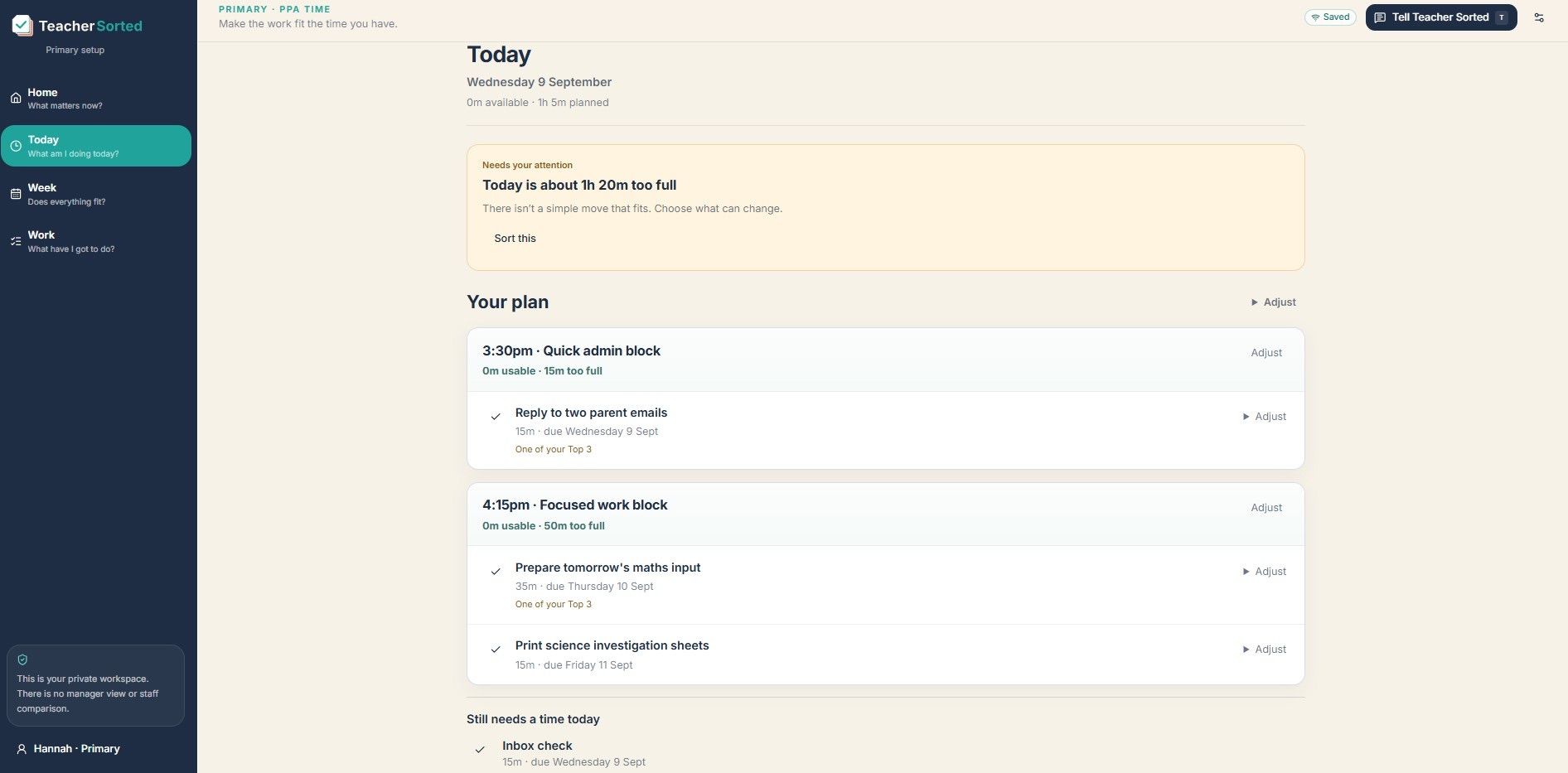
It helps you look at the work you have to do, the time you genuinely have available and whether those two things actually fit together.
Not whether they ought to fit. Whether they do.
Admin Sorted tackles the next bit.
Once you've decided that a job belongs in the time you have available, can we make some of that job quicker to get through?
A quicker parent letter doesn't magically solve teacher workload. I don't want to pretend it does.
But if a piece of admin takes less effort, that matters. Fewer blank pages, fewer repeated rewrites and fewer small jobs expanding to fill the time around them all help.
You can use Teacher Sorted’s workload tools to work out where the job fits. Then, for the jobs Admin Sorted supports, you can use it to get the first draft, structure or planning in place.
And sometimes the answer will still be: this doesn't fit today.
That's fine too.
The answer to teacher workload can't simply be "do everything faster".
Start with the annoying job in front of you
I don't think teachers need another impressive list of AI features.
They need useful tools for the jobs that are actually sitting on their list.
So if you have a parent message that has been lurking in your head all day, start there.
If you need to organise a visit, plan an assembly, shape a pupil support target or turn meeting notes into something other people can act on, there is a job for that too.
Pick the job. Give Admin Sorted the information it needs. Check what it gives you. Change it if you need to. Use it if it helps.
That's really the whole idea.
Teacher Sorted helps you make the work fit the time you have.
Admin Sorted helps you get some of that work done.